Phase 4: Cutover
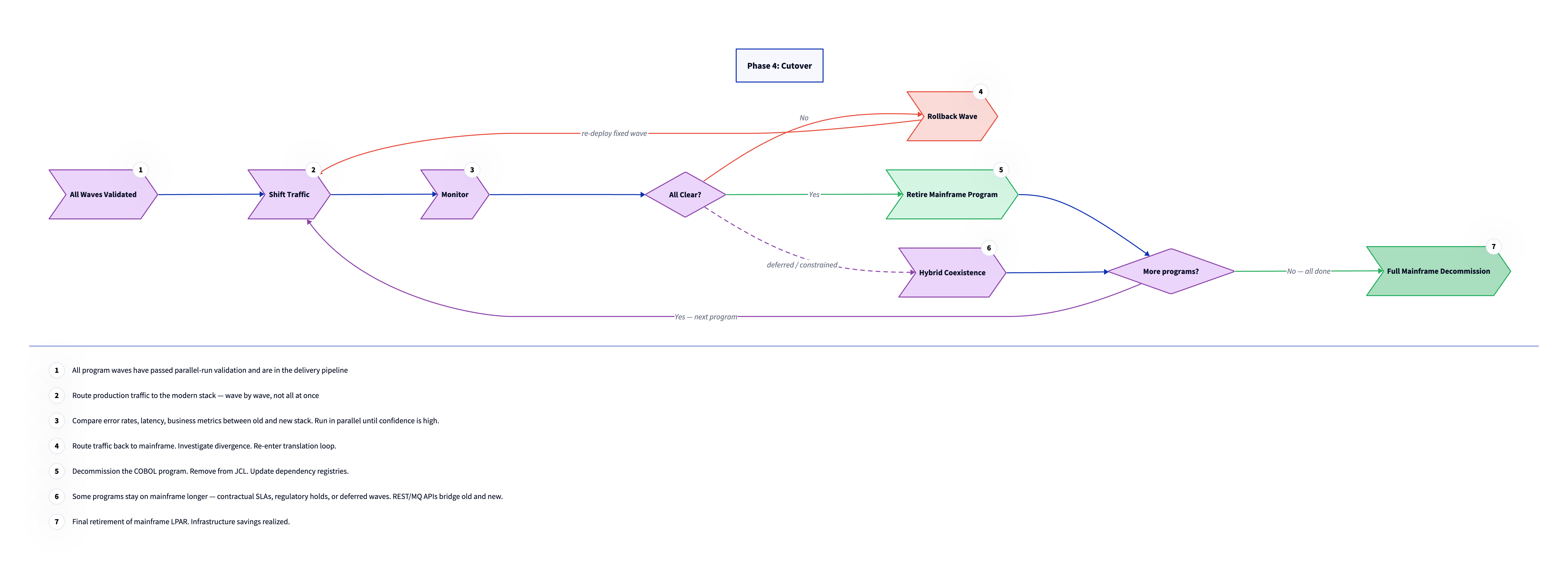
Phase 4 is the transition from running parallel to running solo. Traffic shifts to the modern stack, the mainframe programs retire, and eventually the mainframe itself is decommissioned. This happens wave by wave, not all at once. The same discipline that governed Phase 3 governs Phase 4: each wave earns its independence before the next wave starts. The pace of cutover is determined by confidence, not by schedule pressure. A wave that passes parallel validation and runs cleanly in production for its defined observation period moves to retirement. A wave that shows divergence or unexpected behavior rolls back and re-enters the translation loop. The mainframe is not a liability at this stage. It is the fallback that makes it safe to move fast on the modern side.
LPAR (Logical Partition). A hardware partition on an IBM mainframe that runs an independent instance of z/OS. Mainframe software licensing and hardware costs are typically billed per LPAR. Full mainframe decommission means shutting down the LPAR, at which point IBM licensing and hardware costs stop.
Shift traffic wave by wave
Cutover takes two distinct forms depending on whether the migrated program is API-backed or green screen. For API-replacement flows, cutover is an integration layer configuration change. The flow that currently routes requests to the mainframe backend is updated to route to the new service instead. This change is owned by the migration team as part of the wave deliverable. Consumer applications see no change. The mainframe program continues running as a fallback during a monitoring period, typically days to weeks per wave, and is retired once confidence is established. The client's integration team takes over operational ownership of the updated flow after the monitoring period closes.
For green screen terminal workflows, cutover is a user-facing transition. Users stop accessing the CICS terminal application and start using the replacement web application. This requires the web application to be fully accepted before the terminal sessions can be decommissioned. Training, a transition period with both systems available, and explicit sign-off from operational leads are all part of this track. This is where most schedule risk lives in a typical migration, because user adoption cannot be automated.
Monitor and respond
Monitoring during cutover watches for three categories of signal. Correctness checks ask whether the modern system's outputs still match the mainframe. Performance checks ask whether the modern system is handling production load within acceptable response time and resource bounds. Business impact checks ask whether downstream systems, reports, and SLA-governed processes are behaving as expected. Divergence in any of these categories triggers a rollback. Traffic routes back to the mainframe, the investigation begins, and the wave re-enters the translation loop. This is not a failure state. It is the safety mechanism working as designed. A rollback in Phase 4 means the estate is still intact, the business is unaffected, and the team has a specific signal to investigate rather than an unexplained production incident.
Retire mainframe programs
When confidence is high, typically after a wave has run in production for its defined observation period without divergence, the mainframe program is retired. It is removed from JCL scheduling, flagged as decommissioned in the dependency registry, and archived. The modern service takes full ownership of that function from that point forward. Retirement is a deliberate act with a specific record. The dependency registry is updated so that no future program analysis treats the retired program as an active dependency. The JCL change is documented. The archive preserves the original source for audit purposes but removes it from the active library. At this point, the wave is complete.
MuleSoft Anypoint. A common enterprise integration platform that mediates between mainframe systems and modern cloud applications. Mainframe services are exposed as REST APIs through the integration layer (MuleSoft, IBM API Connect, Apache Camel, or equivalent). Consumer applications only see the integration layer's API surface, which is why incremental migration is possible without changing those applications. After migration, the integration layer continues to manage data sync with SAP, OpenText, and other enterprise systems.
Handle deferred programs
Some programs may stay on the mainframe longer than planned due to contractual SLAs, regulatory holds, or late-breaking sequencing dependencies. For these, MuleSoft or an equivalent integration layer bridges the old and new systems via REST or MQ APIs, so that the modern stack can interact with the deferred mainframe programs without direct coupling. The goal is to minimize the number of deferred programs and to have a clear timeline for each one. Without a timeline, deferred programs become permanent residents, and the mainframe estate stabilizes at a reduced but still expensive size. Treating each deferral as a tracked obligation with a target retirement date keeps the estate shrinking predictably rather than accumulating a long tail of indefinitely deferred migrations.
Full decommission
Full mainframe decommission comes when every wave has cleared and no programs remain in active production on the mainframe. This is the infrastructure cost reduction event: the LPAR is shut down, the IBM software licensing stops, and the hardware contract ends. For a large estate, this milestone is typically measured in years from the start of Phase 1. The business case for migration usually does not require full decommission to show a return. Reducing the estate by 60 to 70 percent typically recovers the migration cost through reduced IBM licensing fees and reduced mainframe staffing costs before the final programs are retired. Full decommission is the clean ending, but the ROI inflection point arrives well before it.
User-facing cutover: replacing green screen workflows
Not all mainframe programs are behind an API. Many COBOL estates include online programs that users access directly through 3270 terminal sessions — the "green screen" interface that predates web browsers. For these programs, cutover is not a routing change. It is a user-facing transition that requires a web application to exist and be accepted before the terminal sessions can be decommissioned.
This distinction matters enormously for planning. API-replacement cutover is owned by engineering and integration teams. Green screen cutover is owned by everyone: engineering builds the replacement, product design makes it usable, and change management gets the people who have used the same keyboard shortcuts for 30 years to switch to something new.
The parallel availability period is not optional
Running both the green screen and the web application simultaneously for a defined period is not a concession to slow adopters — it is the mechanism that surfaces design gaps before they cause operational problems. Users who default to the old screen are telling you something. They find specific workflows faster on the terminal, or the web version is missing a feature they rely on, or they have a keyboard shortcut that saves them 30 seconds on a task they do 50 times a day. That information is valuable and needs to be captured, not bypassed.
A parallel availability period with active feedback collection is cheaper than an emergency rollback after decommission.
Keyboard-first design is a migration requirement
3270 terminal users navigate almost entirely by keyboard: tab, enter, PF keys, and positional memory about where fields appear on the screen. A web form that requires a mouse to perform common operations will fail user acceptance even if every field is present and the underlying logic is correct.
The replacement application needs to support full keyboard navigation for all primary workflows. This means tab order that matches the user's mental model, enter-key submission, keyboard shortcuts for the most common actions, and no mouse-only interactions in the critical path. It is a concrete design requirement that belongs in the migration specification alongside the functional requirements.
BMS maps are reference data, not wireframes
The most common mistake in green screen replacement is treating BMS screen map definitions as the specification for the replacement UI. A BMS map defines what fields exist and roughly where they appear on a 24-line by 80-column grid. It does not define what the user's workflow is, what decisions they are making, or what information they need to make those decisions efficiently.
The better starting point is task analysis: what is the user trying to accomplish, in what sequence, and what information do they need at each step? The BMS map tells you what data the program handles. The task analysis tells you how to structure a UI that serves the person at the keyboard. These are related but not the same thing.
Shop floor and operational environments have distinct requirements
Green screen terminals in maintenance shops, warehouses, and operational settings are used in conditions that office-centric web applications are not designed for. Users may be wearing gloves. The environment may be loud, bright, or physically demanding. Sessions may be interrupted frequently. The physical distance from the screen may be greater than a desk setup assumes.
Replacement web applications for these environments need to be tested in those environments, not in a conference room. Text size, contrast, touch targets, and session timeout behavior all need to account for the actual use context.
Training and change management are a project workstream
Many migration projects allocate engineering time and minimal change management time. The green screen retirement date then gets pushed, not because the replacement application is incomplete, but because users have not adopted it. The technical readiness gate and the user readiness gate are separate things, and the user readiness gate takes longer.
A realistic wave plan for green screen replacement includes a user adoption milestone — a defined threshold of active usage on the replacement before the terminal sessions are decommissioned. It also includes a training program designed around the actual user population, not a generic "here's the new system" walkthrough. Users who have been doing the same task the same way for two decades need time, and they need to understand why the change is happening, not just how to operate the new system.